|
BullCharts User Group
|
 |
Some of the monthly User Group webinar sessions
and some of the User Group presentations are recorded,
and listed here for you to view
You are here: Share
Market Toolbox > BullCharts
> User Group > webinar
recordings
Related pages: Software
Features, Getting
Started
- Intro, Getting
Started
- #2 (Watchlists), Getting
Started
- #3 (Scans (market filters),
Getting
Started #4
- Indicators, Templates, Workspaces, Getting
Started
#5
- More about indicators and BullScript,
Getting
Started #6
- How to use BullCharts,
Robert's KnowledgeBase, Remote Users Webinars,
FAQs, TradeSim
(for backtesting),
Notes about the meeting and webinars and the recordings listed below |
About the webinars:
|
Webinar or meeting
|
Topics covered
|
September 2026
|
Full recording of the
webinar PLUS: "How to find the best performing stock in the last week in the previous month" In this August 2026 webinar meeting, we set the
following challenge: (a) How did you find this security
(eg. using a market/BC scan?); The rest of this video comprises the balance of the webinar session, including a summary of the Melbourne meeting one week prior, as well as the question and answer segments late in the meeting. See the video at YouTube.com (45 mins). |
July 2025
|
Robert
Brain - Reviewing less-known BullCharts
features. This 52 minute recording is from the BullCharts User Group webinar (July 2025). Like many software tools and applications, BullCharts includes many features, many of which most users will not use very often, or perhaps have forgotten about, or are simply not even aware of. But these features can be so very useful. In this session we will review many of these, including the following:
|
October 2024
|
Des
Bleakley - Trailing Stops - Effective or not?
and can we use them as a trading system? This video is a 60 minute recording from the BullCharts User Group webinar (October 2024). Many traders are comfortable using technical analysis Trailing Stops as part of their trading strategy; but are they effective? How can we measure their effectiveness and thence use them to our benefit? In this session Des shares information about a Trailing Stop indicator to provoke some great discussion, and even suggests it could be used as the basis of a trading strategy. Des shares and explains his custom indicators which are in the user group Google Drive, including:
|
May 2024
|
Phil
H - Sharing information about the BullCharts
custom indicator "Burtyy" indicator and ribbon This video is a 61 minute recording from the BullCharts User Group webinar (May 2024). Session details and key points covered include:
|
January 2024
|
Robert
Brain - Which of two stocks is the
out-performer? This video is a 70 minute recording from the BullCharts User Group webinar (January 2024). After you’ve done your scan or search, and you’ve found two investing/ trading candidates, how to choose the best one to buy? That is, which is the stronger performer? How can we measure share price strength? Is it simply the percentage share price gain over a period of time? If so, which period? Or should we use a chart indicator? If so, which one? But what if the stock is over-bought and due for a retracement? How can we tell? In this video we explore this dilemma, and demonstrate some of the key features of the BullCharts charting software which can assist, including:
The presentation topic and discussion runs for 40 minutes, and the rest of the video is the remainder of the BullCharts User Group (BCUG) meeting. See the video at YouTube.com (70 mins). |
November 2023
|
David
Woodside - demonstrates two trading strategies
in BullCharts - Jason McIntosh, Carl Capolingua This video is a 58 minute recording from the BullCharts User Group webinar (November 2023). David Woodside has spent some time researching the trading strategies of popular or well-known traders. In this session David describes a strategy from Jason McIntosh, and one from Carl Capolingua, and David explains in detail how to implement their strategies in BullCharts – into BullCharts indicators and scans. See the video at YouTube.com (58 mins). |
October 2023
|
Des
Bleakley - All about BullCharts BullScript -
creating a chart indicator from scratch This video is a 90 minute recording from the BullCharts
User Group webinar (October 2023). Des Bleakly leads
this session along the lines of: "Introduction to
BullScript". Have you ever wanted to write a
custom BullCharts chart indicator, but didn't know where
to start? Take a journey from the very basics of
BullScript to the completion of a useful and meaningful
indicator, that will set you up to write more of your
own. You will also be well placed to understand
and to modify scripts from within the large BullCharts
library you already possess. |
September 2023
|
Robert
Brain - Bullish observations in the price
charts - MACD chart indicator This video is a 70 minute recording from the BullCharts
User Group webinar (September 2023).Many traders and
investors look for various “bullish signals” to help
find potential trading and investing
opportunities. There are a number of so-called
bullish observations which can be found on the price
charts, and even scanned for using our BullCharts
software scans. |
August 2023
|
Robert
Brain - Trend Trading, Moving Averages and
more This video is a 90 minute recording from the BullCharts User Group webinar (August 2023). Robert Brain leads a discussion about how to spot the potential Big (stock) Moves such as the 60+% move in AGL in early 2023. This includes examining a few different Moving Average options, daily and weekly charts, Exponential and Weighted MA, as well as Donchian Channel, MACD, "Wilson Initial High" indicator, and more. See the video at YouTube.com (90 mins). |
June 2023
|
Paul
Kilmister - The Ichimoku Cloud chart indicator This video is a 61 minute recording from the BullCharts User Group webinar (June 2023). The Ichimoku cloud chart indicator – Is it the complete technical analysis trading tool? It may look complicated, but it is actually an alternate way to show all of: support, resistance, momentum, trend direction and multiple averages, all on the one chart, as well as predict future support and resistance. In this video, Paul will demystify all this in this video. See the video at YouTube.com (61 mins). |
April 2023
|
Des
Bleakley - Exploring the benefits of the
Linear Regression lines This video is a 58 minute recording from the BullCharts User Group webinar (April 2023) where Des walks through some examples of using the Linear Regression tool in BullCharts, and explains how he uses it, with some good examples. Items covered include:
|
September 2022
|
Des
Bleakley - Des demonstrates RealTest
backtesting software This video is a 73 minute recording from the BullCharts
User Group webinar (September 2022) |
August 2022
|
Peter
Furner - How I use BullCharts to find stocks,
and demonstrating my indicators This video is a 50 minute recording from the BullCharts User Group webinar (August 2022). Session details and key points covered include:
|
July/August 2022
|
"A
Trend, A Trend - My Kingdom for a Trend" - Des
Bleakley and PMVX strategy This (83 minute) video is a recording from the BullCharts User Group webinar (the July session, delayed a week into August 2022). Des Bleakley shared his latest PMVX trend-trading strategy, with back-testing details. Key points include:
|
April 2022
|
"Sharing
my strategy" - David Woodside - Trending
Stocks, and HHV, LLV functions This video is a 45 minute recording from the BullCharts User Group webinar (April 2022), and BullCharts users can also see the BullCharts scan and some screen shots slides in the BCUG Google Drive facility. Session details and key points covered include:
|
March 2022
|
"Sharing
my strategy" - Phil H - "Go Score" This video is a 45 minute recording from the BullCharts User Group webinar (March 2022), and BullCharts users can also see the BullCharts scan and some screen shots slides in the BCUG Google Drive facility. Session details and key points covered include:
|
January 2022
|
"Sharing my strategy"
- Col Briody - Moving Average Cross-over This video is a 42 minute edited recording of the BullCharts User Group webinar in which Col describes his Moving Average Crossover strategy. An excellent and detailed Trade Plan document is included in the notes that are available in the BullCharts User Group Google Drive. The actual BullCharts scan definition file (and the Trade Plan) is available for users in the Google Drive. This session also includes some great BullCharts (software) tips including:
This video is a recording from the BullCharts User Group webinar (January 2022), and BullCharts users can also see the BullCharts scan, the Trade Plan, and some screen shots slides in the BCUG Google Drive facility. See the video at YouTube.com (42 mins). |
September 2021
|
Trend metrics -
Measuring trend strength In this user group webinar meeting we set out with the objectives of:
See the edited webinar video at YouTube.com (49 mins). In this video we explored many of the trend-related tools and chart indicators in BullCharts software, and along the way we explored and demonstrated all of the following tips [the numbers in square brackets refer to the minutes and seconds into the video recording to help you find specific items which might one day be edited out into their own short videos]:
|
August 2021
|
Heikin Ashi candle
chart In this video Alek Jankowski explains the key points
about the Heikin Ashi technical analysis candle chart,
how it's made, and how to use it. The video recording
includes the presentation with a good explanation, plus
the Q&A session with some questions and
contributions from other BullCharts users. |
November 2020
|
Miscellaneous
presenters - Your Favourite Indicators - Disparity Index
and more Our BullCharts users tend to use a variety of technical analysis chart indicators to help them with their share price analysis, and to help specify hard selection and entry criteria, as well as exit criteria. In this session we had a round table discussion
focusing on some of the most popular indicators. Other indicators discussed and demonstrated include:
The video includes other discussion on the latest BullCharts version number, plus several BullCharts tips. See the video at YouTube.com (48 mins). |
October 2020
|
Robert B - Analysing
and annotating price charts to record your technical
analysis and notes How do you manage to record the details of your
technical analysis of the price charts? Do you draw
trend lines and make notes and various annotations
directly on the price chart on your computer? Do you end
up with too many annotations and a cluttered chart? What
about studies in different time frames such as daily and
weekly, and what about studies of both the short term
and long term? It can get rather messy and awkward. The BullCharts features that are introduced include
(plus many BullCharts tips): |
September 2020
|
David W -
Demonstrating "How I use BullCharts" The BullCharts charting software is very powerful with many, many features. In this session David Woodside explains how he uses many of the features of BullCharts, and how he has tried quite a few chart indicators. This was recorded in a live BullCharts User Group (BCUG) webinar session and includes lots of BullCharts tips and demonstrations. This video recording includes David's demonstration of the stages he went through when developing his current collection of favourite indicators, and how he tried different indicators and different parameters. And the video recording includes a lot of great question and answer segments towards the end, including Robert's detailed explanation of what the MACD indicator is, and how it is derived.The indicators that David walls through, with some explanation, and the related discussion topics include the following:
|
August 2020
|
Protecting your
capital with the ROC indicator In the first 38 minutes of this recording from our BullCharts User Group webinar (August 2020), Phil walks us through how he uses the ROC technical analysis indicator to look for a weakening share price and sell down a position so as to protect his capital. The remaining 17 minutes of this recording include some general BullCharts Questions and Answers (aka tips and hints). See list below. Also!! Phil's custom indicator ribbons are available in our new user group BCUG-GD facility (our Google Drive growing collection of useful BullCharts materials).
See the video at YouTube.com (55 mins). |
July 2020
|
Hands-on use of: GMMA
and CBL In this 50 minute recording from our BullCharts User Group webinar (July 2020), Phil walks us through and describes the Guppy MMA chart indicator and the Count Back Line (CBL) tool - what they are, how to use them and how to interpret the signals. This includes two of Phil's own custom BullCharts ribbon indicators. Also!! Phil's custom indicator ribbon, and the slides from his presentation, are available in our new user group BCUG-GD facility (our Google Drive growing collection of useful BullCharts materials).
|
March 2020
|
"What works for me" -
DavidW showing the Donchian Channel This 28 minute video was recorded during the Australian
BullCharts User Group webinar on 25 March 2020. It shows
David Woodside's customisation of the Donchian Channel
chart indicator in BullCharts, with explanations and
descriptions and a Q&A session at the end.
|
March 2019
|
Demonstration - How
to create a custom indicator using script text from
another user It is often useful to take the (script) text from another user's chart indicator, and create a new custom indicator in your own BullCharts system. In this video, Des shows how to take the text from an email and copy and paste it into a new BullCharts indicator using the Indicator Builder feature.
|
December 2018
|
Demonstration of
adding API links to Excel to display price data There is a way to set up an Excel spreadsheet that displays share price data. In this video, Rick shows us how to set this up.
|
June 2018
|
TradeSim introduction
and demonstration The TradeSim software module is used for back-testing sharemarket trading and investing strategies in the BullCharts charting system. This 34 minute video explains how BullCharts and TradeSim work together, and includes a demonstration to show the steps involved, and some of the things to watch out for.
|
April 2018
|
BullCharts -
Templates and Workspaces Exactly what is a BullCharts Template? and how is it
different to a BullCharts Workspace?
about BullCharts Templates and about BullCharts Workspaces. |
March 2018
|
BullCharts
Security
Manager and Control Panel
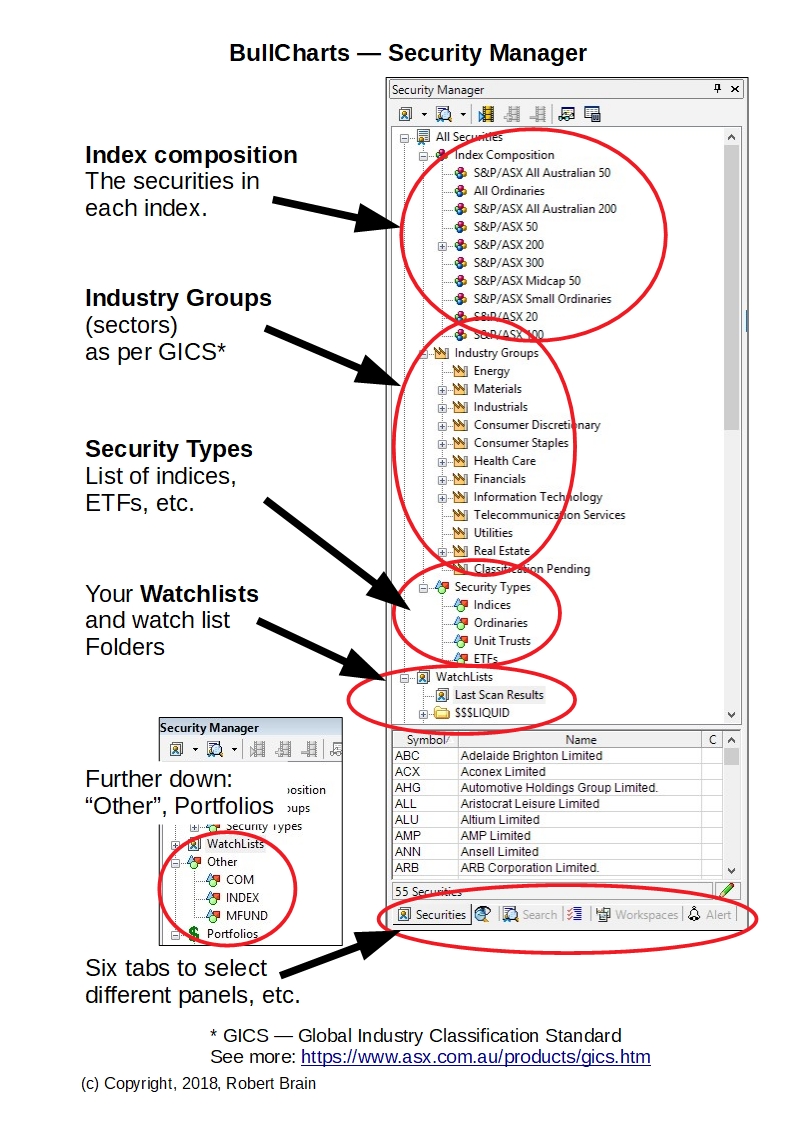
The Security Manager and the Control Panel are key features of the BullCharts charting software. They are the panels of information that normally sit at the right side of the BullCharts window. This video recording from the user group webinar session explains the ins and outs of the Security Manager (30 mins).
The Security Manager (see diagram at right - click on it for a larger version) includes:
The video recording from the user group webinar session explains the ins and outs of the Security Manager (30 mins). Free handouts - Two hand-out documents were also made available to BullCharts users. They are two eBook (PDF) Articles from Robert's collection of Articles: The March 2018 Remote User Group webinar (and the Melbourne meeting) featured a demonstration and explanation of the Security Manager as a part of the regular webinar session. |
January 2017
|
BullCharts - What's
New in version 4.4 BullCharts version 4.4 was released for production use
(March 2017). The January 2017 Remote User Group webinar
(and the Melbourne meeting) featured a demonstration of
the key features as a part of the regular webinar
session. These videos were recorded during the webinar
session.
|
November 2016
|
BullCharts - What's
New in v4.0 to 4.3 Over the last couple of years there have been some nice
new features (and tweaks) included in the BullCharts
package. The November 2016 Remote User Group webinar
(and the Melbourne meeting) featured a demonstration of
many of these as a part of the regular webinar session.
This video is an unedited recording of the webinar
session.
|
March 2016
|
Ichimoku Charting The March 2016 User Group in Melbourne featured a 40
minute
also see Robert's BullCharts KnowledgeBase. |
July 2015
View
the full recording here |
BullCharts (some
tips) and the $100k portfolio This video (1 hour 6 minutes) is an as yet unedited and
raw recording of (with the time from the start of the video):-
also see Robert's BullCharts KnowledgeBase. |
May 2015
View
the full recording here |
BullCharts version
4.0 - Key features and the $100k portfolio This video (1 hour 6 minutes) is an as yet unedited and
raw recording
also see Robert's BullCharts KnowledgeBase. |
July 2014
|
BullCharts
version 4 - New features and enhancements In this webinar we walked through the set of powerpoint slides to explain the key features and enhancements in the new Version 4 of BullCharts. The recording of this webinar has been edited into shorter videos that focus on each of the separate topics listed below. See the What's New web page for the links to the videos. The version 4 key features include.
|
September 2012
(webinar date 25 September) |
Key Topic - Trends The following BullCharts topics were covered, and are mentioned in the webinar recording, and will soon be added as shorter clips with references in the BullCharts KnowledgeBase.
|
July 2012
(webinar date 25 July) |
|
January 2012
(webinar date 25 January) |
|
September 2011
(webinar date 4 October) |
|